Corporate AI Training · Hong Kong & Online Worldwide

Corporate AI training in Hong KongLunch & learns, workshops and team programmes.

Help your team understand what AI can do, then put it to work. Start with a beginner-friendly Lunch & Learn, build skills in a hands-on workshop, or develop real workflows over a longer programme. Delivered in English, on-site in Hong Kong or live online.

Formats & Scope

Shaped to fit your team.

From a one-hour AI lunch and learn for the whole office to a standing advisory arrangement for one team — the format follows the work.

AI Lunch & Learn

A beginner-friendly introduction for the wider team: 45 minutes of practical demonstrations and 15 minutes of questions. No laptops or AI accounts needed.

Explore the Lunch & Learn →

Half-Day Workshop

A single focused session — enough to get a team fluent in the fundamentals and walk out with one or two automations already built.

Multi-Session Team Programme

Several sessions over weeks or months, each building on the last, moving through your team's real workflows one by one.

Ongoing Advisory

A standing arrangement for teams that want their AI capability to keep compounding — new tools, new workflows, as they arrive.

Every engagement is scoped to the team in the room — whether that room is your Hong Kong office or a video call spanning three time zones. Get in touch and I'll put together a customised approach.

AI Lunch & Learn · Hong Kong & online

Show your team what AI can do in an hour.

A practical first look for people asking, “What could this do in my working day?” Christian Ng connects the possibilities to familiar corporate tasks, with time for the room's questions.

45 minutes of demonstrations
15 minutes of questions

  • Understand: turn a long email thread into a meeting brief, decisions and open questions.
  • Analyse: turn a spreadsheet into a useful chart, then trace the findings back to the numbers.
  • Create: see a briefing, visual or small working tool take shape from a clear instruction.

People leave with a clearer way to brief AI, check its work and choose one appropriate task to try. Examples use fictional, sample or approved material; live tools depend on company policy, licences and location.

Ask about a Lunch & Learn

Preview the session

Sample only

AI at Work: your working day, reimagined

This recording is a sample of the hour, so you can see the shape of it. Scroll through the story or use the arrow keys.

In the room the hour is live. Christian still uses a presentation, then runs demos on Claude, ChatGPT or Copilot, whichever your people already use, and follows the questions as they come. The examples land on your company's work that morning.

Open the sample ↗

Who It's For

Built for teams whose day runs on documents, decks and spreadsheets.

Banks & Finance Teams

Structuring, credit and ops teams that live inside spreadsheets and pitch decks — training that removes the busywork without touching what compliance controls.

Professional-Services Firms

Legal, accounting and consulting teams, where the billable hour makes every hour saved show up directly on the bottom line.

SMEs & Owner-Run Businesses

Lean teams doing five jobs each. AI does the work of the hire you can't make yet — without adding to headcount.

Ops & Back-Office Teams

The people who keep everything running quietly. Give them the tools and they out-automate the rest of the building.

Where teams stand today

There's a gap opening between the teams actually using AI and the teams still talking about it — and it isn't closing on its own.

What Your Team Builds

Not slides about AI. Work, built with it.

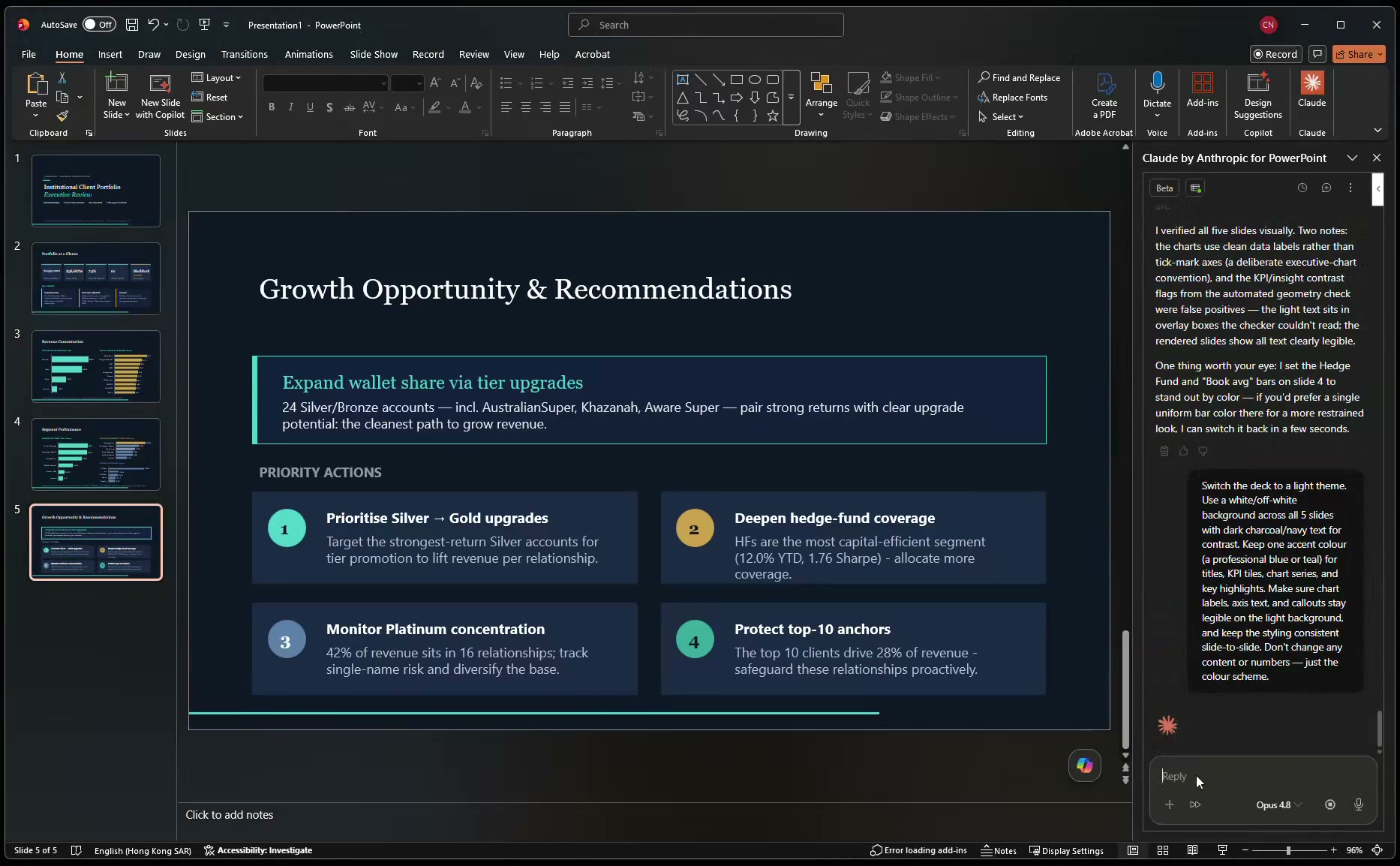
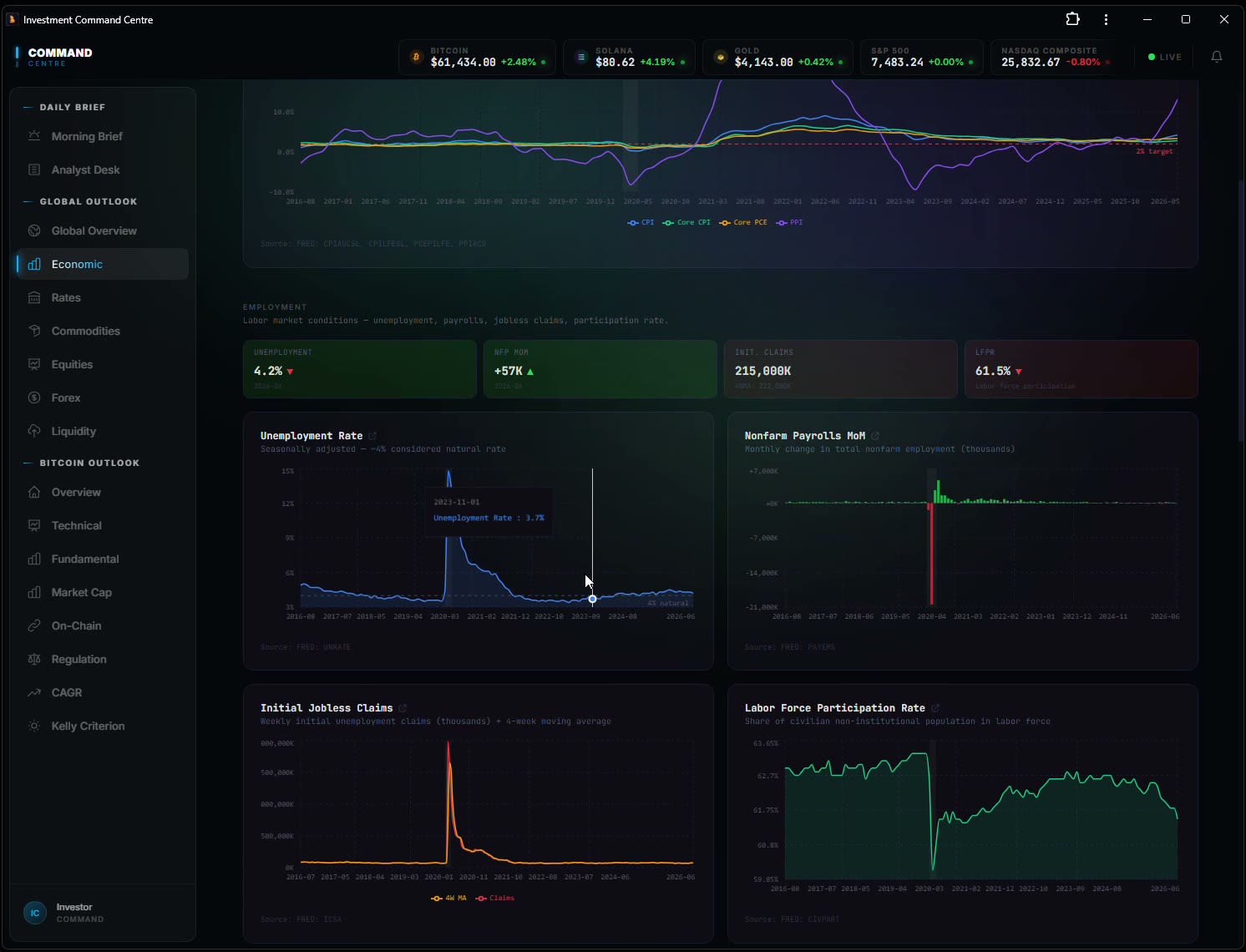
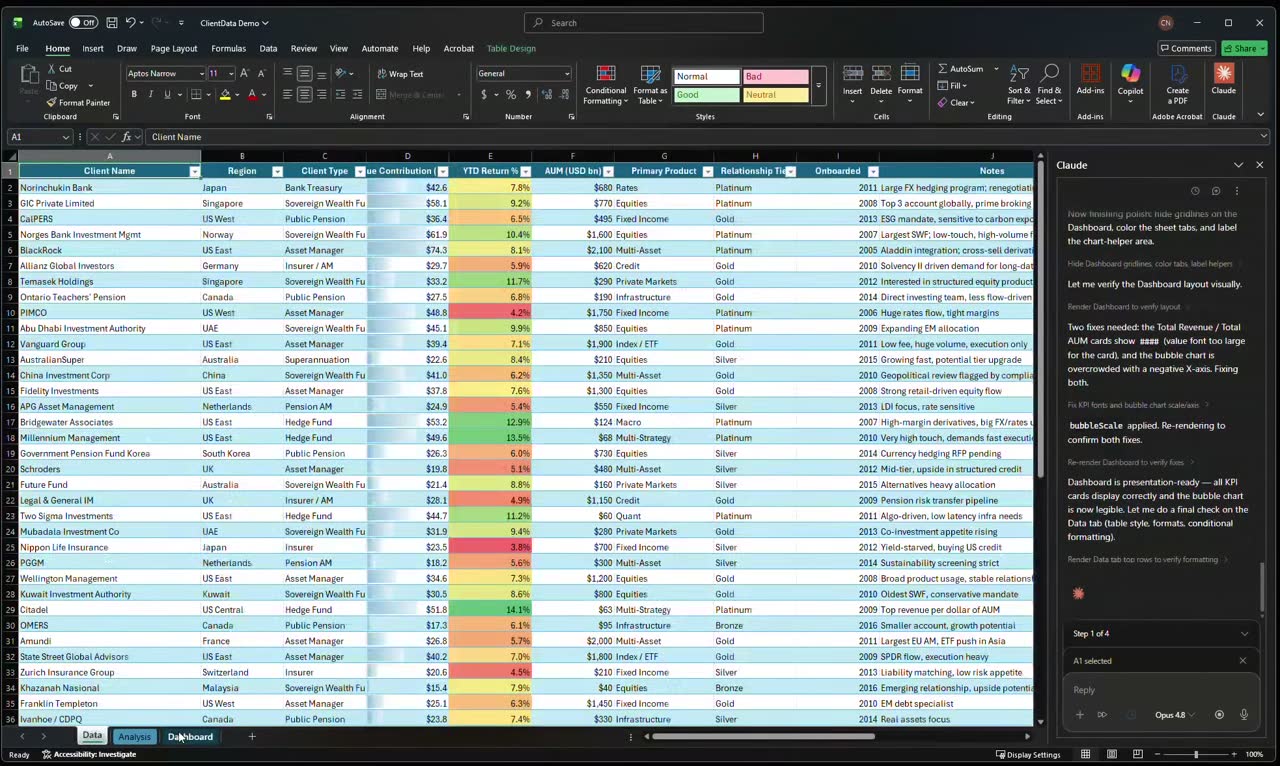
Every image below is a real deliverable from a real session — built with the client, on their own material, inside two hours.

Download Slide from a client PowerPoint deck drafted and formatted by AI
Client deck — drafted and formatted in minutes
Download the actual deck ↓
Live Demo A live investment dashboard tracking markets and rates
Live investment dashboard
Open the live dashboard →
Download A spreadsheet analysis automated from raw client data
Spreadsheet analysis, automated
Download the Excel file ↓

The Comparison

Three ways to train a team. They are not the same thing.

For one generic day on the fundamentals, a public course is a perfectly good answer. Past that, the format changes what your team actually walks away with.

Comparison of a public course, a university programme and Metis AI corporate training, across who's in the room, what you work on, who delivers it, what you leave with, where it happens, and what happens after the last session.
Dimension A public course A university programme Metis AI
Who's in the room Strangers from a dozen industries. Executives from many firms, cohort-based.
What you work on Sample files and generic exercises. Case studies and frameworks.
Who delivers it Whoever is rostered that day. Faculty, sometimes with guest practitioners.
What you leave with Slides and a certificate. A framework and a credential.
Where it happens A training room. A campus.
After the last session You're on your own. Alumni network.

A public course

Who's in the room
Strangers from a dozen industries.
What you work on
Sample files and generic exercises.
Who delivers it
Whoever is rostered that day.
What you leave with
Slides and a certificate.
Where it happens
A training room.
After the last session
You're on your own.

A university programme

Who's in the room
Executives from many firms, cohort-based.
What you work on
Case studies and frameworks.
Who delivers it
Faculty, sometimes with guest practitioners.
What you leave with
A framework and a credential.
Where it happens
A campus.
After the last session
Alumni network.

How It Works

From scope call to working automations.

1

Scope call

A short call to understand your team, your tools and where the time actually goes.

2

Working sessions on your real workflows

Two-hour sessions on the documents and tasks your team handles every week — at your office in Hong Kong, or live online with a team spread across offices and time zones.

3

Automations built with the team

Not delivered to them — built alongside them, so the team can rebuild and extend it after I leave.

4

Follow-through

A short follow-up to see what stuck, what needs adjusting, and what to build next.

On confidentiality — sessions can run entirely on sample or dummy documents wherever confidentiality requires it. Each firm's own policies on information handling and approved platforms govern what's actually used.

Christian, founder of Metis AI Advisory

Why Metis AI

Founder-led. No associates.

I spent thirteen years in institutional banking across Asia-Pacific before building Metis AI Advisory. I teach application, not theory — the same private-advisory approach that gets individual clients ten-plus hours a week back, brought into the room for your whole team.

Every session is led by me, personally — no associates, no hand-off partway through, no generic deck recycled from the last client.

Do The Arithmetic

The cost of the hours your team never gets back.

What are 10+ hours a week, per person, worth across your team?

Your payroll already prices your team's time. Set the shape of your team below — the arithmetic does the rest.

Currency

Team size

HK$
hrs / week
hrs / week

An hour of their time costs you

HK$438 / hour

Hours your team wins back — every week

40 hrs

Time reclaimed, in money — every month

+HK$70,000

Time reclaimed, in money — every year

+HK$910,000

A note on what this is — a starting point for a conversation, not a quote. Engagements are scoped and priced per business, against the workflows we find in the scope call. The figure above is the prize, not the promise — the scope call is where we find how much of it is genuinely sitting in your team's week.

Hourly cost is base salary only — monthly salary ÷ (hours per week × 4 weeks), then 52 weeks a year. It excludes MPF, bonuses, benefits and overhead, so a fully-loaded hour costs your business meaningfully more than the figure shown. Ten hours a week is the floor I work to, not the ceiling. Currency options set a typical local starting salary — they are not live exchange rates.

Straight Answers

What companies usually ask first.

Is the Lunch & Learn suitable for AI beginners?
Yes. The session uses familiar tasks and plain language: 45 minutes of practical demonstrations followed by 15 minutes of questions. No AI accounts or laptops are needed for the talk and demonstrations.
Can I start with one-to-one advice?
Yes. A free 15-minute conversation with Christian can help you explore AI for your own role or scope a programme for your company. Private coaching or a team session can follow, depending on your needs. Ask about one-to-one advice.
How much does corporate AI training cost in Hong Kong?
Engagements are scoped and priced per business rather than sold from a rate card, because a half-day for four people and a multi-month programme for thirty are not the same product. The scope call establishes which workflows are actually costing your team hours, and the quote follows from that. The first conversation is free and carries no obligation.
Can you run the training on-site, or does it have to be online?
Both. On-site with your team in Hong Kong is the default and usually the better session — people build faster in a room together. Live online works well for teams split across offices or time zones, and for firms outside Hong Kong entirely. Sessions are the same either way: your own material, worked on live.
How many people can be in a session?
Two to ten, for hands-on training. Above ten, it stops being training on your workflows and starts being a lecture — which is a different and less useful product. Larger firms are usually better served by running several small cohorts than by one big room. The one deliberate exception is the AI lunch and learn — a talk-and-demo format built for the big room.
Do you run AI lunch and learns?
Yes. A lunch and learn is a one-hour talk-and-demo over lunch — live demonstrations of Claude, ChatGPT and Copilot on workflows your industry will recognise — and because nobody's hands are on a keyboard, the whole floor can sit in. It's the natural first step for a larger firm: the wider team sees what's possible over lunch, then a smaller group goes hands-on in a half-day workshop or a full programme. See the Lunch & Learn format and presentation preview.
Do you run one-off AI workshops in Hong Kong?
Yes. The half-day AI workshop is the shortest hands-on format: one focused session for two to ten people, run on your own documents, and the team leaves with one or two automations already built. It runs on-site in Hong Kong or live online. If the whole floor needs to see what is possible first, the one-hour lunch and learn is the talk-and-demo alternative, and the workshop is the natural next step from it.
What if our documents are confidential?
Most sessions run on live material, but they do not have to. Where confidentiality requires it, sessions run on sample or redacted documents that mirror the structure of the real ones — the workflow your team learns is identical. Where the material can be used directly, an NDA is signed before anything is shared.
Which AI tools do you teach?
Whichever ones your firm actually permits. In practice that usually means Claude, ChatGPT and Microsoft Copilot, plus whatever is already inside your stack. The training is built around what your IT and compliance functions have approved — there is no point teaching a tool your team cannot open on Monday.
How is this different from a public course or a university programme?
A public course teaches generic exercises to strangers from a dozen industries; a university programme teaches frameworks and case studies to a cohort. Both are reasonable for one generic day on the fundamentals. This works on your own decks, spreadsheets and client documents, with only your team in the room, and your people leave holding automations they built themselves. The comparison table above sets out the differences line by line.
Is corporate AI training covered by the Technology Voucher Programme?
The Technology Voucher Programme stopped accepting new applications after 31 December 2024, so a new training engagement cannot seek TVP funding. If your organisation has an earlier approved project, check its approval terms with the TVP Secretariat. Check the current rules of any other training funding scheme before budgeting. Read the government's closure notice.
What happens after the last session?
Your team keeps everything built during the sessions — the prompt library, the workflows, the automations. For firms that want the capability to keep compounding as new tools arrive, an ongoing advisory arrangement is the standing version of that. It is optional, and nobody is signed into it by default.

The Next Move

Find the right starting point for your team.

Tell Christian what you want people to learn. He will reply personally to arrange a free 15-minute scope call.

Prefer email? christian@metisaihk.com

Private and confidential. No newsletter. See our Privacy Policy.