The 07:00 brief
Calendar, typhoon signal, the three emails that matter, what is due, the overnight market line. One message on your phone.
Read on the MTR instead of forty notifications.
Hong Kong & online
Forty small jobs a week: the inbox, the school circular, the dinner nobody booked. Agents run them while your laptop is shut. You approve. They act.
Your fleet, an ordinary Tuesday
Why people call me
You have been reading about AI agents for months. Somebody on LinkedIn says they built one over a weekend.
You have not, because the weekend does not exist. Neither does the headspace to work out which tool, which account, which risk.
You do not want a course. You want someone to sit down with you, decide what to hand over, and set it up while you watch.
That is the whole offer. I do the fiddly part, you keep the logins, and you leave knowing how to drive it.
What changed this summer
Not prompts in a box. Each agent has a browser, files and your own logins, and works while your laptop is shut.
Now a monthly subscription, paid to the platform, not to me. You buy which jobs to hand it, and the rules.
Proof, not a demo
Kadee Folker, founder of Bloom by Kadee, wrote her own account of the work. Her inbox and invoice filing now run without her, and two more owners came on her referral.
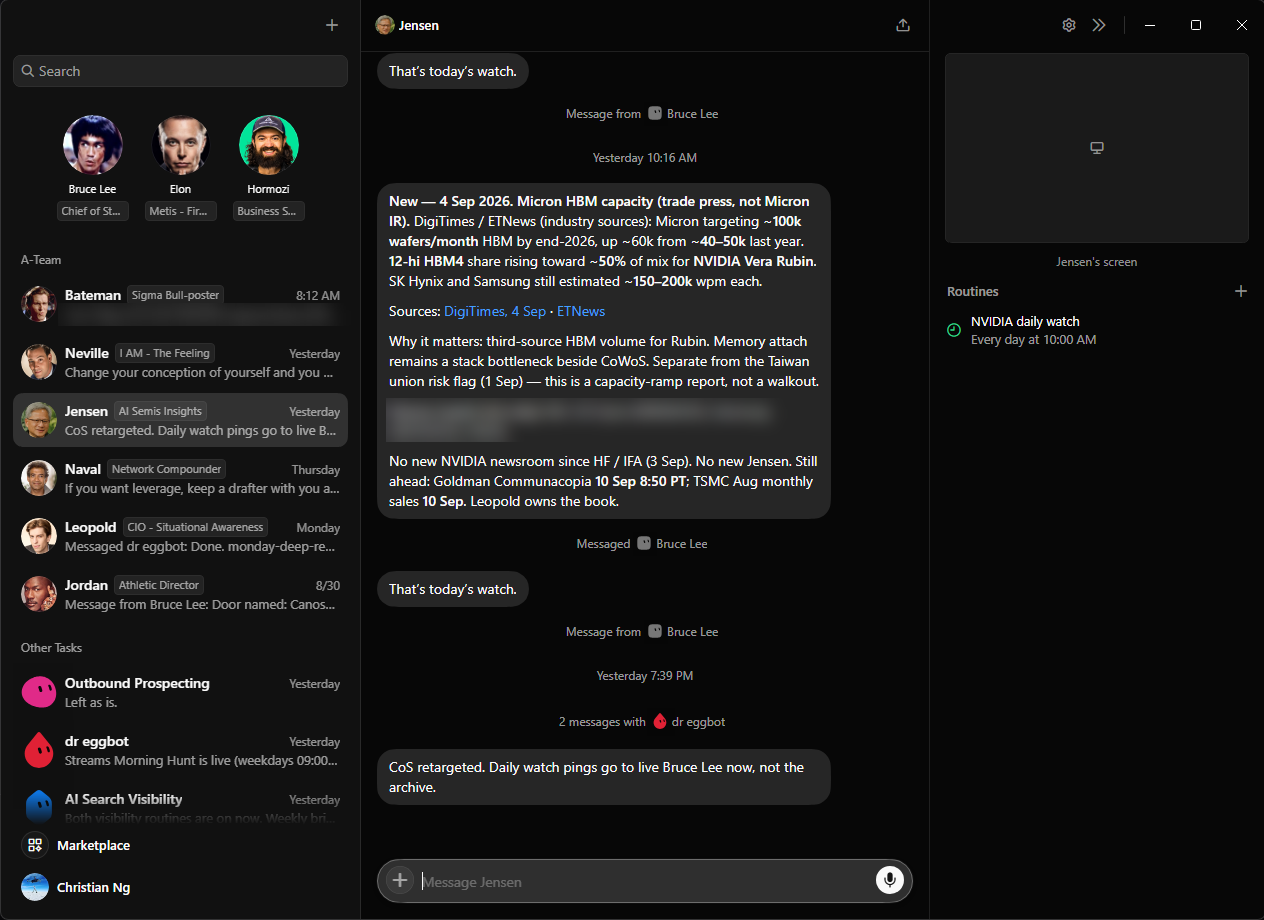
My own fleet, in the app. One job each. You name yours. Mine are people I would want in the room.
Watch them run
The dinner is a real reservation in Central. The circular runs through the app itself. Half a minute each.
The catalogue
A starting point, not a menu. Not on the list? Describe it and I build it. Shortlist up to five; an install starts with three. Anything that sends, books or pays asks first.
Calendar, typhoon signal, the three emails that matter, what is due, the overnight market line. One message on your phone.
Read on the MTR instead of forty notifications.
Files the noise, drafts the routine replies, leaves them waiting for your yes. You still press send.
Twelve replies drafted before you sit down. You approve six, bin two, rewrite four.
Say it once and the invite exists: right people, right place, right time, guests included.
"Dinner with Sarah, Friday 7:30, Central." Done before you find your calendar app.
Name the occasion, area and budget. It shortlists, books on the restaurant's page or drafts the message for your yes, then calendars it and invites the guests.
"Client dinner Thursday, four people, Cantonese, Central." Or Sunday yum cha for eight near Mum's in Kowloon Tong.
Flights and hotel shortlisted inside your rules, itinerary in your calendar, check-in reminders, arrival cards prepared for you to submit.
Nothing is bought until you say so.
HKID and passport expiry, licences, insurance renewals, the tax return, MPF, card fee waivers, helper contract and visa dates.
The reminder arrives three weeks out, with the form already found.
Photograph the newsletter, English or Chinese. Every date, dress-up day and permission slip lands in the family calendar, reminder set.
No more discovering Book Week at 7:40 on the morning of.
Forward or screenshot the class WhatsApp thread. 214 unread becomes the two that need you, reply drafted for you to send.
You read two lines, not two hundred.
Swimming, piano, tutoring: reschedules, confirmations, fees due, next term's sign-up windows.
The tutor's message gets a reply the same hour, drafted for your yes.
The week's meals from a fridge photo and the allergy list, a shopping list in aisle order, the note to your helper in her own language.
Sunday night, dinner is decided for the week.
Vaccinations, dentist and paediatrician dates, refills, appointment slips into the calendar, records in one place. Never medical advice.
The next jab is on the calendar before the clinic reminds you.
Hospital Authority slips to the calendar, medication reminders, the driver or helper booked, a weekly check-in list.
Photograph the slip. Tuesday 9:20 at Queen Mary is now a calendar entry with a reminder the night before.
Birthdays tracked, gifts shortlisted under budget, the lai see budget before Chinese New Year, party logistics drafted.
One message on the 20th: "Mum's birthday is in ten days. Three ideas under HK$1,500."
Positions and moves from your broker statements, news on your names, HKEX announcements and ex-dividend dates. Tracks and reports. Never trades or advises.
Read before the Hong Kong open. Decisions stay yours.
What changed, what is due (results, dividends, rights issues, IPO windows), your own written triggers checked against price.
The trigger you wrote in January fires in June, in writing, whether or not you remembered it.
Reset notices, your bank's cap, a plain line when the repayment changes, and the refinance date flagged three months out.
"One-month HIBOR moved. Your October repayment rises by HK$640."
Statement dates on every card, fee-waiver reminders, Asia Miles and Avios expiry, a monthly subscription audit.
The 38,000 miles that would have lapsed in March do not.
Rent received on the 1st, renewal and stamp duty dates, rates and management fees, repairs logged, matching listings twice a week.
Messages to tenants are drafted for your yes.
Statements, dividend vouchers and receipts collected all year, so the return workings are drafted for you to check and file.
May stops being a weekend of searching your email for PDFs.
Enquiries from email, your website and Instagram drafted in your tone and queued for a yes. Forward WhatsApp ones for the same.
Every enquiry answered inside the hour, in your words, on your say-so.
Quote on your template, invoice numbered, FPS and PayMe receipts matched, the polite chase on day 7 and 14, everything filed.
Built first for Kadee Folker's consultancy, where the invoice filing now runs itself.
Cash, receivables and pipeline from Xero, QuickBooks or Sheets, on one page before the week starts.
You know the number before anyone asks for it.
Every lead into the Notion CRM, follow-ups drafted on your schedule, a "gone quiet" list every Friday.
Nobody who said "maybe next month" is forgotten next month.
BR renewal, the annual return, MPF by the 10th, the employer's return, audit and tax dates, staff visas.
The BR renewal arrives with the form found, not with a penalty.
Google and Instagram or Xiaohongshu comments answered in your voice, the content calendar kept, posts drafted from your voice notes.
Drafted, never posted without you.
The roster, leave requests, reorders when stock hits your level, the Monday ops checklist.
The reorder is drafted when the count hits twelve. You approve it in one word.
Who you are meeting, the last emails between you, their company's news this month, and what you promised last time.
One page, on your phone, in the lift.
Newsletters, SFC and HKMA circulars and unread research, cut to five bullets a day with your topics flagged.
The circular that matters to your desk reaches you the morning it lands.
After each meeting: note filed, follow-up drafted, promise tracked. Fridays, the "who's gone quiet" sweep.
Talk for a minute after the meeting. The rest is filed.
Receipts photographed as they happen become the claim on your firm's form at month end. You check and submit.
No more Sunday night with a shoebox of receipts.
Tuesday and Thursday drafts from your voice notes, in your register, presented for approval. It never posts on its own.
The same routine that drafts my own posts.
Runs, gym and sleep from Strava, Apple Health or Garmin, a Sunday review, the week's plan fitted around your calendar.
The marathon plan bends around the Tuesday client dinner, not the other way round.
Sunday evening prompts, answers filed in Notion, a quarter-end audit against the goals you wrote down.
The questions you would ask yourself if anyone made you sit still.
The annual body check booked, specialist follow-ups tracked, records in one place. Never medical advice.
The booking is drafted. You confirm the date.
Cantonese, Mandarin or Japanese from your own word list at 08:00, plus the reading list and notes from each book.
Ten minutes on the MTR, every day, on words you will use this week.
Birthdays, "you have not seen X in three months", the dinner handed to the booking agent, the congratulations note drafted.
The friendships that survive a busy decade are the ones somebody scheduled.
Career agents live on your phone and in the cloud, on your personal accounts, away from work systems. Nothing on the work laptop. Client data stays out.
Build your fleet
Nothing picked yet. Choose up to five agents above. Your map appears here with the hours it gives back and the install that fits. No email needed.
Free, fifteen minutes. I will tell you if it is not worth doing yet.
My own estimates, from installs I have run. The map call replaces them with yours.
Your map is on its way to Christian. Expect a reply within one working day with a time for the free 15-minute call, and an honest view on whether an install is worth your money yet.
How it works
You describe your week. I name the three agents that would change it, or say not yet.
Switch on the platform, then tell me which accounts the agents may use. Ten minutes, from your phone.
Standing orders first, chief of staff live in thirty minutes, specialists on your real inbox. You approve a real send before we finish. In person anywhere in Hong Kong, or over a shared screen from any timezone.
In the same sitting we run your real examples together: what to ask for, how to word a standing order, what to do when an agent gets it wrong. You practise on the jobs you actually have.
Everything lives in your own accounts. Anything that breaks in the first seven days, I fix by message.
Pricing, published
Australian dollar prices are shown at a fixed reference rate of A$1 = HK$5.55.
One session · two hours
Half-day session · one review
For a team or a whole function: The Practice, from HK$60,000. To learn to build these yourself: AI-Fluent, six sessions, HK$19,600.
See the coaching ladderIf I cannot see three agents worth running, you pay nothing. If they are not running when we finish, I stay until they are.
50% to book, 50% at the end, by FPS, PayMe or bank transfer against an invoice. I run every install myself. Terms.
The standing orders
Agents are good at the sequence and bad at the stakes. These are the defaults; we write yours in the first twenty minutes.
Straight answers
The next move
Build your map above, or take the free call cold. Either way you leave knowing what to hand over first.
The goal was never technology. The goal is your time back.